Compare the strengths and limitations of secure messaging apps, including encryption coverage, metadata handling, and business controls.
The best secure messaging app for business is one that combines end-to-end encryption by default with accounts the organization manages. Signal, Threema, WhatsApp and Wire encrypt conversations end to end by default, Element does so for direct messages and private rooms, and Telegram only in one-to-one Secret Chats. For organizations, Wire adds SSO, SCIM, guest controls and self-hosting, so IT can manage access when people join, change roles or leave.
In this guide, we’ll compare popular messaging app options like Signal, Threema, and WhatsApp and show how Wire stands out as the most secure messaging option for business use.
Want to see the Wire platform right away? Get in touch with our team to see how you can deploy an E2EE communication app at your company today!
Key takeaways
- When comparing secure messaging apps, check how each protects group chats, calls, and shared files, since encryption coverage and default settings vary.
- Businesses need clear ownership of work accounts and a reliable way to manage devices, approve external participants, and remove access when employees leave.
- Metadata collection, backup protection, and message deletion also affect confidentiality, so assess what information remains available outside the conversation and who can access it.
- Wire brings end-to-end encrypted communication together with enterprise account management, guest controls, and flexible deployment options, helping teams manage sensitive conversations within and beyond their organization.
What is a Secure Messaging App?
A secure messaging app is a communication platform that uses end-to-end encryption (E2EE) and strict data-protection protocols to ensure that only the sender and the intended recipients can read messages, view files, or listen to calls. Unlike standard text or chat apps, the provider or third parties cannot intercept or read your conversations. These apps also provide additional security features like account security, device verification, backups, and participant management.
Read our guide to how encrypted messaging apps work to learn more.
What Should Businesses Check When Comparing Messaging Apps?
Businesses should compare messaging apps based on how they protect conversations, manage users, and support everyday work. Test the following areas when making a choice:
- Encryption coverage: Confirm whether end-to-end encryption applies by default to individual messages, group chats, calls, and shared files. Check how bots, integrations, recordings, and other features affect who can access conversation content.
- Account ownership and access: Establish whether employees use personal accounts or organization-managed identities. Check how IT provisions accounts, approves devices, and removes access when someone leaves or loses a device.
- External collaboration: Review who can invite guests, approve new participants, and change group membership.
- Metadata and backups: Ask what information the service collects about users, devices, and conversations. Verify where backups are stored, whether they are E2EE, and who controls recovery keys.
- Device support and usability: Test messaging, calls, document sharing, and account recovery across the mobile and desktop devices your team uses. Include external participants in the pilot to identify access or onboarding problems.
For a fuller assessment of what security-first organizations look for in a messaging app, check out the enterprise messaging platform guide.
How Do the Leading Secure Messaging Apps Compare?
Let’s compare some of the leading secure messaging apps through a business communication lens and see how Wire stands out as the best choice.
1. Wire: Secure Messaging With Enterprise Access Controls
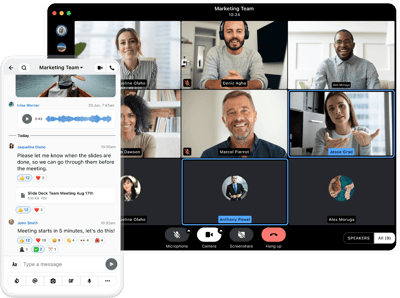
Wire brings messaging, voice and video calls, conferencing, and file sharing into one app, with end-to-end encryption enabled by default. It supports confidential communication within teams and with external partners, alongside tools for managing users, devices, and access. It’s already being used by 1,800+ organizations, and you can check out their testimonials here. What Wire does well:
- Protects conversations by default: Messages, calls, and files shared through Wire Messenger are end-to-end encrypted. Its implementation of Messaging Layer Security (MLS) supports encrypted group communication.
- Simplifies account management: SSO and SCIM let organizations connect sign-in and user provisioning to their existing identity systems.
- Supports external collaboration: Guests can join through a browser without creating an account, with limited access rights. We also recently introduced Viewer Mode, which offers view-only access for temporary guests, enhancing collaboration while ensuring file security and controlled access.
- Connects separate organizations: Federation allows approved Wire deployments to communicate while administrators control which backends and users can connect.
- Supports everyday use across devices: Mobile and desktop apps, browser access, and multi-device support help employees stay connected throughout the workday.
- Offers deployment choices: Organizations can use Wire Cloud, their own cloud infrastructure, or an on-premises deployment to meet their operational requirements. Check out Wire’s deployment options.
2. Signal: Private Communication With Limited Organizational Administration
Signal provides end-to-end encrypted messages and calls, disappearing messages, and safety numbers for verifying contacts.
What Signal does well:
- Protects personal conversations: Encryption applies automatically to messages and calls.
- Limits phone number exposure: Usernames and privacy settings let people connect without sharing their number, although registration still requires one.
- Supports linked devices: Users can synchronize chats and recent media when linking supported devices.
- Provides group permissions: Administrators can manage membership and require approval for people joining through group links.
What businesses need to consider
Organizations using Signal for official communication need to consider how they will manage employee accounts, approved devices, and access when someone leaves, since its group permissions do not provide centralized control over these processes.
The 2025 SignalGate incident, in which a journalist was accidentally added to a group discussing military operations, shows why organizations also need clear controls over who can join sensitive conversations. Verifying participants and making external involvement visible can help teams identify an unintended recipient before sharing confidential information. Read our analysis of SignalGate and organizational messaging for more.
Where Wire fits
Wire adds organization-managed access through SSO and SCIM, together with controls for guests and external collaboration. These capabilities help IT teams connect communication access to employee and contractor lifecycle processes.
Learn more at Signal vs. Wire
3. Threema: Privacy-Focused Personal Messaging
Threema encrypts messages and media end-to-end and removes messages from its servers after successful delivery.
What Threema does well:
- Separates identity from a phone number: Users can exchange their Threema IDs directly.
- Minimizes server-held information: Contacts and group information are primarily managed on user devices.
What businesses need to consider
Buyers should distinguish Threema Private, Threema Work, and Threema OnPrem before comparing capabilities. The platform also lacks easy and secure ways to integrate guest users, leading to insecure external collaboration.
Where Wire fits
When comparing Wire vs. Threema, Wire offers SSO, SCIM, guest access, and federation between separate backends, making it the better choice for business communication.
4. Element: Messaging Across the Matrix Network
Element uses Matrix, an open communication standard that supports conversations across independently operated servers.
What Element does well
- Supports federation: Organizations can communicate across approved Matrix deployments.
- Offers infrastructure control: Buyers can choose hosting arrangements that match their operating requirements.
- Supports multiple devices: Verification and encrypted key recovery help users access conversation history.
- Provides enterprise governance: Relevant server offerings include advanced identity management, federation controls, and auditing
What businesses need to consider
- Element’s capabilities depend on the client, server, subscription, and configuration. Review room encryption, history visibility, device recovery, federation policy, and any bridges connecting other services.
- Enterprise auditing can retain conversation content and room events when enabled. Include the audit system’s access permissions, storage, and retention in the security assessment.
Where Wire fits
Wire also supports controlled federation, enterprise identity integration, and flexible deployment. It also combines security, ease of use, and enterprise-grade compliance without the setup complexity. Learn more at Wire vs. Element.
5. WhatsApp: Consumer Messaging
WhatsApp protects personal messages, group conversations, and calls with end-to-end encryption.
What WhatsApp does well
- Provides default E2EE for personal conversations: This includes personal group chats.
- Supports communication across devices: Linked devices can connect independently.
- Offers additional privacy settings: Users can manage group invitations, lock chats, and configure disappearing messages.
What businesses need to consider
WhatsApp is primarily a consumer messaging app, but when employees use it without IT approval, it becomes shadow IT, making it harder for the organization to track where sensitive information is shared, manage access, and remove former employees from work conversations.
Read more about WhatsApp’s encryption and its limitations and the governance risks of WhatsApp at work.
In our recent survey of IT, security, and compliance leaders, 48% said sensitive information is sometimes or often shared via tools not designed for secure communication, while 42% use WhatsApp, Signal, or similar consumer messaging apps for work collaboration. These findings show why organizations need an approved communication tool that employees find easy to adopt and use. Download our latest State of Secure Collaboration report to explore the findings.
6. Telegram: Cloud Messaging With Optional Secret Chats
Telegram supports messaging, file sharing, large groups, and broadcast channels.
What Telegram does well
- Supports large communities: Groups offer administrator permissions, topics, and moderation tools, while channels support broadcasting updates.
- Provides access across devices: Cloud chats synchronize across mobile, desktop, and web applications.
- Offers private one-to-one conversations: Secret Chats provide end-to-end encryption and self-destructing messages when users enable them.
What businesses need to consider
Telegram’s standard private chats, groups, and channels are not end-to-end encrypted. Secret Chats provide this protection only for one-to-one conversations and remain tied to the devices where they were created. Confidential team discussions in standard groups therefore fall outside Telegram’s end-to-end encryption coverage.
Businesses also need to assess account ownership, employee departures, and device access. Learn more about how safe Telegram is for enterprise use.
Where Wire fits
Wire provides end-to-end encryption by default for messages, group conversations, calls, and shared files. SSO and SCIM connect account access to organizational identity systems, while guest controls and federation support managed collaboration with external participants. Find more information at Wire vs. Telegram.
Why Organizations Choose Wire for Secure Messaging
Wire combines end-to-end encrypted communication with tools for managing employee accounts, external participants, and deployment. These capabilities help organizations govern sensitive conversations across teams and partners.
|
App
|
Message encryption
|
Organizational account management
|
Self-hosting
|
|
Wire
|
End-to-end encryption enabled by default for individual and group conversations.
|
SSO, SCIM provisioning, and role-based administration.
|
Private-cloud and on-premises options.
|
|
Signal
|
End-to-end encryption enabled by default for individual and group conversations.
|
Individual accounts with group administrator controls.
|
No supported enterprise self-hosting option.
|
|
Threema
|
End-to-end encryption enabled by default.
|
Central management is available through Threema Work. But lacks easy and secure ways to integrate guest users.
|
Available through the separate Threema OnPrem offering.
|
|
Element
|
End-to-end encryption enabled by default; configuration can permit unencrypted rooms.
|
Enterprise identity and administration capabilities depend on the server offering.
|
Self-hosted and air-gapped options.
|
|
WhatsApp
|
End-to-end encryption enabled by default for personal messages and group chats.
|
Standard accounts provide group controls without enterprise SSO or SCIM provisioning.
|
No self-hosting option for the messaging service.
|
|
Telegram
|
Standard chats and groups lack end-to-end encryption; one-to-one Secret Chats provide it.
|
Individual accounts with group and channel administrator controls.
|
No self-hosting option for the Telegram service.
|
Compare Wire with the alternatives to explore the differences in encryption, enterprise controls, and deployment.
Or, book a demo with Wire to try the platform today!
Frequently asked questions